
Support
How can we help?
Find answers, guides, and everything you need to get the most out of LinX.
Getting Started
Set up in under 5 minutes.
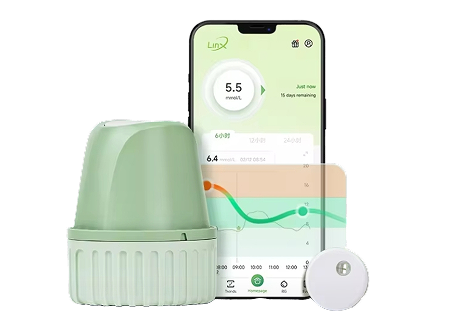
Getting started with LinX is simple: download the app, apply the sensor, pair via Bluetooth, and wait 1 hour for the warm-up. Then you’re ready to go — real-time glucose data, straight to your phone.

Download the LinX app from your app store

Apply the sensor to your abdomen or upper arm

Pair the sensor with your phone via Bluetooth

Wait 1 hour for warm-up, then you’re live
How to Wear
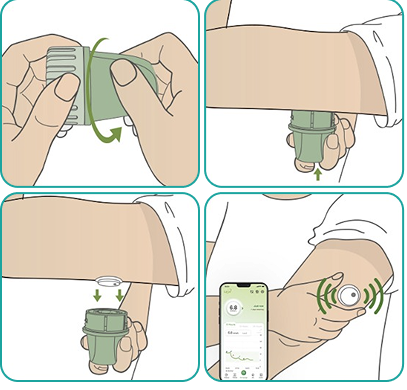
Open the package and unscrew the applicator cover.
Apply firmly to the cleansed area of skin, then press the white button.
Gently remove the applicator to ensure it is securely in place.
Pair with your phone, start to use after warm up.
FAQ
Frequently Asked Questions
What is LinX?
+
LinX is a continuous glucose monitoring (CGM) system that helps you track your blood sugar levels in real time through a small wearable sensor and the LinX mobile app.
Who is LinX designed for?
+
LinX is designed for anyone who wants to monitor their metabolic health — including people with diabetes, pre-diabetes, or those optimising their diet and fitness performance.
Is LinX covered by insurance?
+
Coverage varies by provider and region. We recommend contacting your health insurer directly to check whether CGM devices are included in your plan.
How do I order replacement sensors?
+
You can order replacement sensors directly from our online store or through your subscription plan. Sensors are also available at select pharmacies.
Still Need Help?
Our support team is here to assist you.
Reach out anytime.